
A photograph taken from the back of a town square shows a thin crowd near the stage and a clear passage beside the barriers. Remove the people nearest the camera and the space looks deserted. Fill the gaps instead and it looks packed. Both versions may be visually plausible, but neither records the same event.
Before opening an AI Photo Editor, decide whether the image is reporting what happened or providing a deliberately altered promotional scene. The distinction determines whether a distracting person can be removed at all. Attendance and access are often part of the photograph’s meaning.
Establish The Purpose Of The Event Photograph
An organizer may want a clean background for next year’s poster. A local reporter may need to show turnout. A venue manager may be documenting how a queue used the square. Each person could select the same source file, yet the acceptable treatment differs because the image is answering a different question.
Write that question beside the file. For a record of attendance, people and empty space are both evidence. For a record of access, the barrier opening and the crowd around it matter. Do not classify those elements as clutter simply because the photographer would have preferred a clearer view.
PicEditor AI supports edits to uploaded photographs, including object cleanup. That makes it possible to create an altered campaign image, but it does not supply the editorial permission to change a documentary record. Decide the publication role first, while the source and context are available.
Keep the capture time and viewpoint. A square photographed early in an event may be nearly empty before the main performance begins. No cleanup can turn that view into a reliable account of total attendance. A caption should identify the moment it depicts without asking the picture to establish more.
Try A Crop Before Removing A Person
A crop can sometimes improve composition without reconstructing the scene. Compare a modest crop with the full image and ask what information disappears. Cropping is still an editorial decision: removing the empty half of the square may exaggerate density even though the remaining pixels are untouched.
Keep The Relevant Crowd Pattern In View
If turnout matters, retain enough of the square to show distribution. If a queue matters, retain its beginning and visible end. A tight group of faces cannot establish the length of a line extending outside the frame. Use another photograph when the required context is missing.
Privacy creates a separate editing problem. A visible mask or blur can protect an identifiable person while making the intervention apparent. Generatively removing them fills the space with an invented background and changes the apparent crowd. Choose the treatment according to the image’s purpose and the relevant consent arrangements.
Someone asked to edit a photo for a future campaign should receive a copy labeled for that purpose. Keep the reporting original in another clearly named location. Files travel through message threads and shared folders; a quiet filename distinction is helpful, but the caption should carry the image’s altered status too.
Create The Promotional Version With A Clear Boundary
For a legitimately illustrative use, identify the area being changed and the context that must survive. A cleaned stage background might be appropriate for an event announcement if it is presented as artwork. It should not inherit a caption claiming to show the audience at a particular performance.
Use PicEditor AI to request the specific alteration and save the output as a derivative. Check the rest of the scene for unintended changes to barriers, signs and building features. When the tool fills a person-shaped gap, it may invent plausible paving or architecture that does not match the location.
An AI Photo Editor cannot know which detail a later reader will treat as evidence. A regenerated gap beside a barrier could suggest a route was open. A missing stroller could alter how a family area appears. Review the result against the planned caption and expected use, not only against the editing prompt.
If you need to edit a photo for several formats, approve one derivative before making crops. Then inspect each crop separately. A label outside the square crop may vanish from a story version, leaving a plausible scene with no indication that it was changed.
Consider using a visibly illustrative treatment when substantial reconstruction is necessary. A poster collage or drawing signals a different relationship to reality than a seamless documentary-looking photograph. That stylistic choice does not remove the need for honest captions, but it reduces the chance of a promotional image being mistaken for an event record.
Compare The Promotional Crop With The Event Record
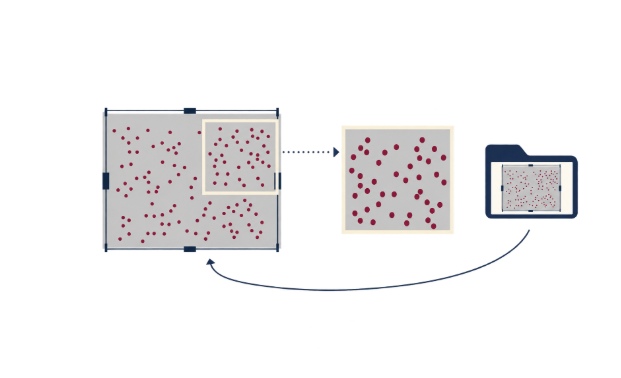
Put the full source, accepted derivative and planned caption together. Ask a colleague unfamiliar with the edit what the image appears to show about turnout, access and activity. Compare that answer with the purpose written at the start. Any unsupported inference needs a different crop, clearer presentation or another image.
Review empty space as deliberately as visible people. A broad clear aisle may look safer or less busy after removal. A few added silhouettes may make a quiet performance appear popular. These are consequences of editing, not minor aesthetic preferences.
Keep a wider frame in the review packet so the editor can check whether the selected view is representative of that particular moment.
Check the image when detached from the article. Social previews, thumbnails and reposts often lose surrounding explanation. If the altered status matters, keep it in a caption or layout that travels with the file, and provide the unaltered source when reporting organizations request a documentary photograph.
PicEditor AI belongs in the production of the illustrative version once that role has been agreed. The original should remain available for anyone assessing what the camera actually recorded. Keeping both versions makes it easier to answer later questions without reconstructing an editing history from memory.
Where An Altered Image Stops Being Evidence
Removing or adding people prevents the derivative from establishing the original crowd distribution. Disclosure explains the alteration; it does not restore the missing evidence. Use the untouched photograph, supported by its time and viewpoint, when attendance or access is the question. Even that single photograph may need other records before a broader conclusion is justified.
Keep The Reporting Photograph With Its Original Caption
Save the source and promotional derivative with their separate intended uses. Record the removed area and keep the approved campaign caption with the exported artwork. That small amount of organization prevents an attractive altered file from becoming the default picture in a later report.
The next editor should be able to tell which file shows the event as photographed. If a cleaner composition is needed, make its purpose clear at the point of use. A public event leaves a record of people, space and movement; removing one of those changes what the image can fairly tell its audience.
